

How to Open a Business Bank Account in Singapore
26 June 2026
Starting a business is exciting. You have ideas to test, customers to serve, and plans to bring to life. But before things get too busy, there is one simple but important move you should make: keeping your business money separate from your personal money.
That is where a business bank account comes in. For entrepreneurs in Singapore, a dedicated business account helps you track income, manage expenses, pay suppliers, receive customer payments – keeping your financial records neat from the start. This gives you a clear view of what’s happening in your company, without personal transactions muddying things up.
Keeping your personal and business finances separate becomes even more important as your business grows, especially when invoicing, payroll, supplier payments and tax preparation start coming into the picture.
Opening a business bank account in Singapore is fairly straightforward, although the exact process can vary from bank to bank. This guide contains everything you need to know about opening a business bank account in Singapore, including eligibility requirements, documents needed, and what to compare when choosing an account.
Let’s get started!
What is a business bank account?

A business bank account is a bank account used specifically for your company’s money. It keeps business income and expenses separate from your personal savings, bills, and everyday spending.
To apply for a business bank account, you will first need an officially registered business entity, this makes opening a business bank account a logical second step for business owners.
Importantly, as your business bank account is held under your registered company’s name, it serves to legally separate your personal finances from any business liabilities that may be incurred.
Many business accounts offer features that support how companies operate. These may include:
- Transfers for paying suppliers, vendors, contractors, or staff
- Payments for receiving money from customers or business partners
- Business transaction records that make bookkeeping and account reviews easier
- Multi-user access so directors, partners, or authorised team members can help manage the account
In short, a business bank account gives your business its own financial home. It helps you stay organised from the start and makes it easier to manage payments, records, and cash flow as the business grows.
How to open a business bank account in Singapore

To open a business bank account in Singapore, you generally go through the following steps: choose an account, prepare the required documents, submit your application, complete verification checks, and activate the account once approved. The exact process can vary depending on the bank account chosen, the business type, and if the application is done online or in person.
For instance, some banks may require branch appointments or manual verifications. Others allow business owners to apply through an app or website. Either way, the goal is the same: the bank needs to confirm who is applying, what the business does, and whether the account can be opened under its onboarding requirements.
One more thing, the lead time for getting your bank account approved can range from a few to several business days. This depends on factors such as which type of bank account you apply for, or whether you choose a traditional bank, digital bank or a fintech platform.
Step 1. Choose a suitable business account
There are different types of business bank accounts available. Rather than defaulting to the one with the most features, you should choose an account that serves your business needs as closely as possible.
For instance, an online retailer that ships globally would want to look for low foreign exchange fees and a range of supported foreign currencies. Meanwhile, a casual dining restaurant might look for flexible credit lines for better cashflow management and checking facilities to pay suppliers. Larger businesses may require multi-user payment approval flows.
The point is, taking the time to look for a business bank account that matches your operational needs will prove rewarding in the long run.
Step 2. Prepare the required documents
The next step is to gather the necessary documents for your bank account application. These documents are required for banks to satisfy regulatory requirements such as Anti-money Laundering.
Typically these are:
- ACRA BizFile
- Certification of Business Incorporation
- NRIC or passport of company directors or partners
- Proof of address for company directors or partners
- Other supporting documents, as necessary
Step 3. Submit your application
Submitting your application depends on whether you’re choosing an account with a traditional bank or a digital bank or fintech platform.
For traditional banks, you will be able to submit your documents and application online in most cases. However, you should expect to pay a visit to the bank for identity and document verification in person. This can be inconvenient if you have directors or partners that are based overseas.
In contrast, digital-only banks or fintech platforms like MariBank do not require in-person visits. Your business bank account application can be done completely online, saving time and hassle.
Step 4. Complete verification checks
Once your application has been received, you will need to undergo verification checks to verify the identity of account users, validate the business and understand the purpose of the account. This is normal when opening a bank account, and questions may be asked around business registration records, types of activity the business carries out, where funds will come from, who the business pays, and what kind of transactions are expected.
Completing verification checks may require making a visit to the bank; this is typically required with traditional banks, as mentioned earlier.
Alternatively, you may be able to satisfy verification checks simply by uploading eligible personal documents; this is commonly practiced among digital-only banks and fintech platforms.
Step 5. Activate your account and start using it
Once your application is completed and approved, your business bank account will be created for you. You can activate your new account and start using it for your business.
What to look for in a business bank account

Not all business bank accounts are the same. Here are some key considerations to keep in mind when choosing one.
Fees and minimum balance
The fees associated with using your bank account are a major factor. Many business bank accounts come with multiple fees such as monthly fees, transfer fees, charges for additional chequebooks, etc. And if there is a minimum balance requirement, going below will trigger a fall-below fee, adding to your banking fees.
Look for business bank accounts with low or zero fees to keep business costs low.
Transfer capabilities
Transfer capabilities are important if you plan to do business across borders, whether receiving payments in foreign currencies, or paying suppliers and vendors overseas. Make sure that your business bank account supports the foreign currency you plan to transact in. You should also check how high the foreign transaction fee is (if any), and also how long it takes to make or receive payments across borders.
Business bank accounts with zero FX fees can provide business savings that stack up over time.
Multi-user access
Multi-user access may be necessary, depending on the size and structure of your business. You may require different signatories to endorse withdrawals and payrolls, for example. Meanwhile, smaller companies may only require just one person to approve account withdrawals.
Ease of digital banking & onboarding convenience
Digital banking is commonplace in personal accounts, so why should business bank accounts be any different?
Choosing a digital-first bank is best for entrepreneurs who want to do business on-the-go. You’ll enjoy having a business account that lets you check balances, make transfers, and view transactions easily from a secure mobile app.
Digital bank accounts also offer quick and fuss-free onboarding. Once approved, you can start using your business bank account right away without any time-consuming branch visits.
Mari Business Account vs Other Business Accounts
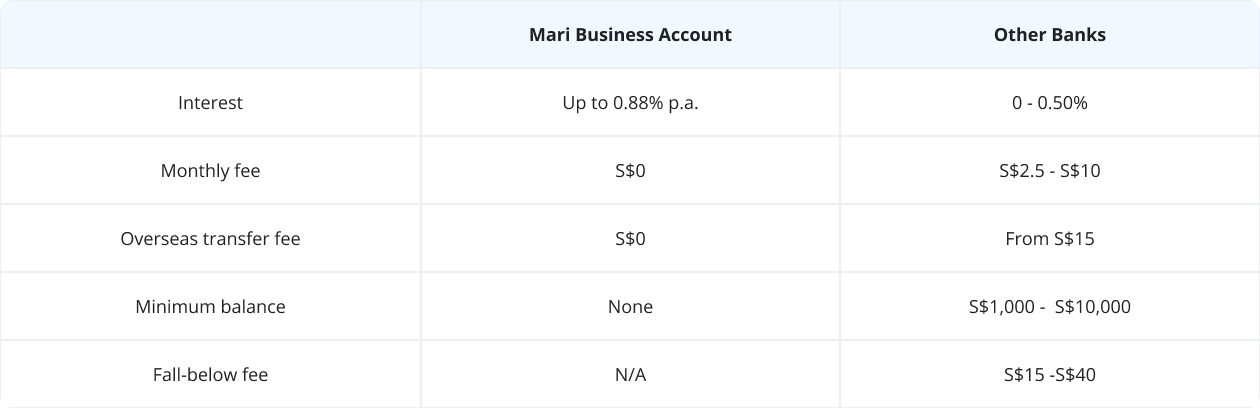
Opening a Mari Business Account
Whether you’re a solopreneur looking to launch your first business, or a seasoned business owner looking for fuss-free business banking, Mari Business Account has got you covered. Here’s why:
- No documents required. We retrieve your business info with Singpass for hassle-free application.
- No fees, no initial deposit. Get the bank account you need for your business without hurdles. Continue using Mari Business Account with no monthly fees.
- No minimum balance. You do not need to maintain a balance on your Mari Business Account, giving you greater flexibility and freedom. There’s no fall-below fee to worry about either!
- $0 transfer fee. Enjoy zero fees on overseas transfers to over 50 destinations, and better forex rates in 20 currencies.
Get your Mari Business Account by following these steps:
- Download the MariBank app to your mobile device.
- Register for a MariBank account with a valid Singapore mobile number.
- Open a Mari Business Account digitally with Singpass.
- Wait for your application outcome. We process all Mari Business Account applications within 1 to 2 days!
Ready to take your business to the next level? Apply for Mari Business Account now!